Introducing online ordering in restaurants: the start checklist
An online ordering channel starts reliably if the menu, delivery logic and internal responsibilities are determined before the first order. This checklist shows restaurant owners what information they provide and what tasks GastroSprint takes on when setting up, checking and handing over the online ordering website.
What needs to be determined before placing your first online order?
Before the first online order is received, the offer, delivery and collection rules as well as the process in the restaurant must be determined. Otherwise, questions will arise when the kitchen and service are busy. Advertising will come later. First, the team needs a coordinated handover.
GastroSprint sets up the online ordering website and checks it technically. The restaurant supplies and confirms offers, prices, delivery rules, opening times and internal responsibilities. This means that the roles are clear and the restaurant does not have to take on the technical implementation itself.
1. Establish restaurant data and responsibilities
First, appoint a person who will be technically responsible for the online offering. It decides on prices, temporarily unavailable products and the approval of changes. In addition, each shift needs clear responsibility for new orders and the indicated processing time.
The basic configuration includes:
- Restaurant name and contact details
- regular and different opening times
- Responsible for menu and order taking
- Reachable telephone number for necessary queries
- Clear process for accepting, rejecting and completing an order
Write down the responsibilities briefly. A simple shift note helps more than a setting that only one person knows.
2. Prepare menu for the online ordering website
A digital menu needs more structure than the printed menu. A guest cannot quickly ask online what size is meant or whether they need to choose a side dish. Therefore, clearly name and price products, variants and extras.
Check for each product:
- Is it in the correct category?
- Are the name, description and price correct?
- Are there sizes or variants with their own prices?
- Which extras are voluntary and which selection is mandatory?
- Are allergens and additives completely taken from the tested source?
- Can the product be prepared reliably during the entire time offered?
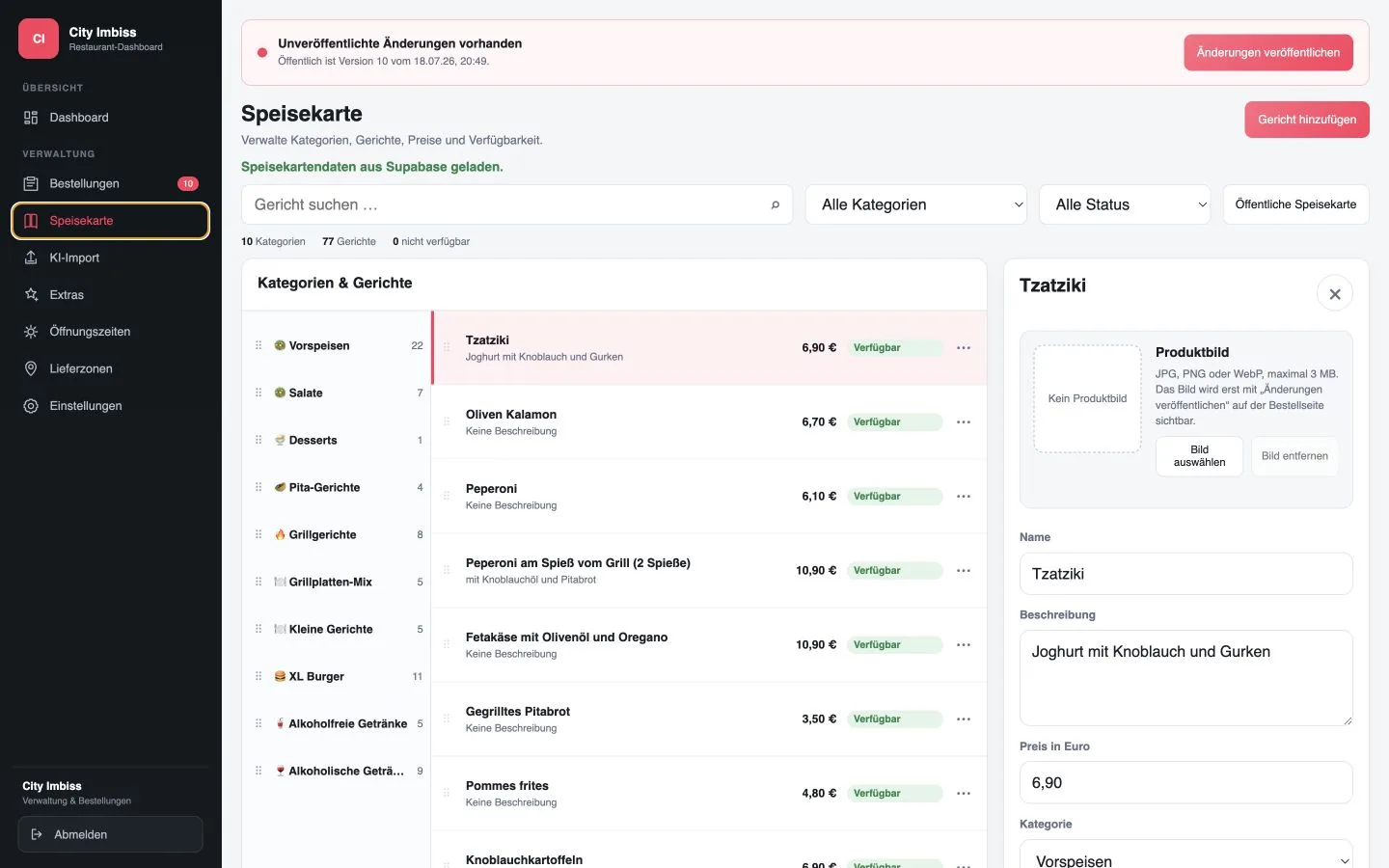
If the card is available as a JPG, PNG or PDF, GastroSprint can use it AI menu import record and prepare it for the shop. The restaurant then confirms prices, variants, allergens and additives. GastroSprint takes care of the technical implementation.
Better to start smaller and correctly
The entire menu does not have to be online on the first day. A smaller range is often easier to manage, especially if certain dishes are difficult to transport or require a lot of coordination at peak times. Base your selection on kitchen performance, not the length of the printed menu.
3. Configure delivery and collection realistically
Delivery area and minimum order value determine which orders the shop can accept. Only report areas to GastroSprint that your team reliably reaches. In addition to the distance, the travel time also includes traffic, finding a parking space, building access and the return journey.
To set it up, GastroSprint requires at least:
- served postal codes or a suitable radius
- Delivery costs per zone
- Minimum order value per delivery area
- realistic delivery time
- expressly excluded areas
- Rule for orders shortly before closing time
Realistic times are also required for collection. Only use a statement like “ready in 15 minutes” if the kitchen and serving area can do this at high capacity. The restaurant determines the operationally possible times, and GastroSprint displays them in the shop.
4. Set order times and pre-orders
Order times and opening times may vary. Maybe the restaurant accepts pre-orders before the kitchen opens or ends online acceptance earlier because delivery is no longer possible later. Such rules must be understandable in the shop and known to the team.
Together with GastroSprint, determine what should apply in the following situations:
- Order during normal opening hours
- Pre-order for a later date
- Order shortly before the acceptance deadline
- Order when the restaurant is closed
- Delivery service temporarily closed but collection still possible
The guest must recognize whether they can order immediately, for later or not at all at the moment. The team needs a clear time indication so that a pre-order is not treated like an immediate order.
5. Hand over the online ordering website to the restaurant
Before starting, GastroSprint sets up the agreed online ordering website and checks the technical process. The smartphone display, shopping cart and order completion, the payment methods offered, transmission to the restaurant dashboard as well as order status and guest information are checked. Technical errors will be corrected by GastroSprint and will not be delegated to the restaurant for review.
The restaurant confirms before release:
- Menu, prices, variants, allergens and additives
- Delivery areas, delivery costs and minimum order values
- Order, pickup and opening times
- the operational process for acceptance, preparation, collection and delivery
- the responsible person per shift
An accompanied sample order can still prepare the team for everyday life. It is not a technical test by the restaurant. Employees can see how an order is received, where notes are placed and how processing time and status are used. GastroSprint accompanies the briefing and remains responsible for the functionality of the shop.
The Function overview shows the interaction between the online ordering website and the restaurant dashboard. The restaurant takes care of kitchen, serving and delivery. GastroSprint provides the agreed ordering channel technically.
6. Consciously limit the start
It's better to start on a small scale than with a big promotion. First, inform regular guests or place a clearly visible link on your own website. Pay attention to where guests or employees still ask questions.
Note in the first phase of operation:
- unclear product names or selection options
- frequent special requests
- unrealistic preparation or delivery times
- Products that are often sold out
- recurring questions when completing the order
These observations show what needs to be improved. New features or additional advertising channels can wait until the basic flow is stable.
7. Keep operational information up to date
Prices, opening times, delivery areas and product availability change. Distribute such changes early or maintain them via the designated administration. The restaurant is responsible for the accuracy of this technical information; GastroSprint ensures your technical representation in the online ordering website.
Check regularly:
- changed prices and product descriptions
- seasonal or no longer available dishes
- Opening hours on public holidays
- Delivery costs and minimum order values
- recurring operational queries from guests or the team
Use the checklist even after you start. The roles remain the same: the restaurant is responsible for the offer and operational process, GastroSprint is responsible for the online ordering website and its technical functionality.
Check the start together
This gives an overview Online ordering system for restaurants. You can have one too request a free demo. GastroSprint takes care of the setup and the checked handover. In the demo, we clarify what information your restaurant needs to provide.
Frequently asked questions
Does a restaurant have to carry out test orders itself?
No. GastroSprint checks the online ordering website, the payment methods offered and the technical order status before handover. A joint sample order can be useful so that the team gets to know the process from the incoming order to the issue or delivery.
Does the entire menu have to be online at launch?
No. A smaller, reliably deliverable starting range is often easier to manage. It is important that guests clearly see which products, variants and extras are available online.
Who should accept new online restaurant orders?
Establish clear responsibility for each shift. This person monitors new orders, confirms realistic processing times and coordinates queries with kitchen or delivery.
Sources and product basis
- GastroSprint: Online ordering system for restaurantsProduct basis for online ordering website, dashboard, delivery zones and order status.Retrieved on
- GastroSprint: AI menu importProduct basis for the controlled import of menus from image and PDF files.Retrieved on