
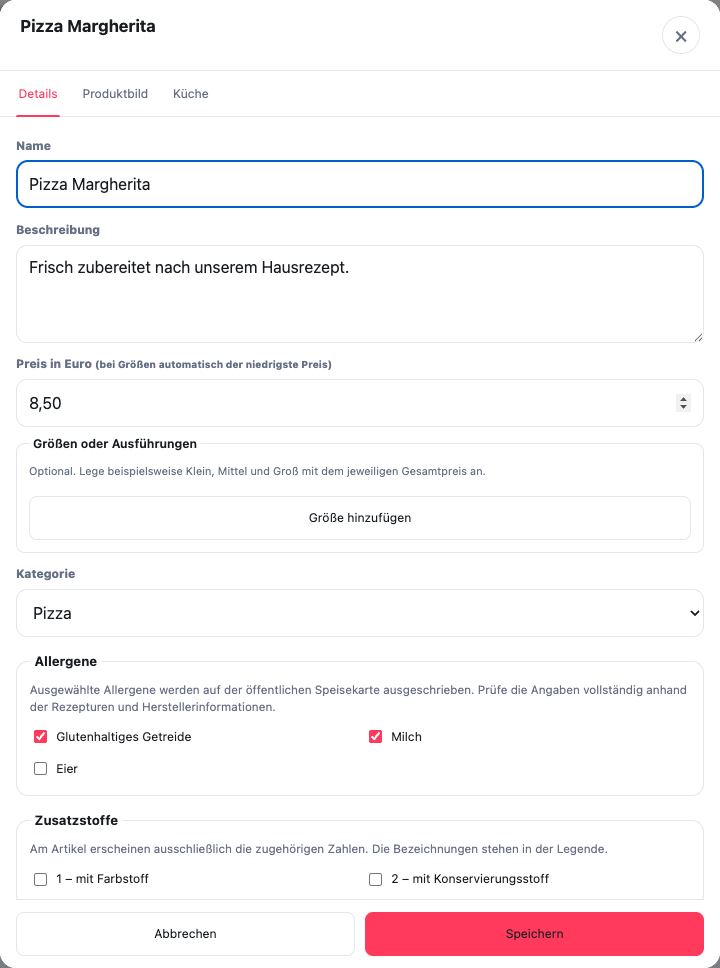
Where do you find the input fields?
Open Menu, click on the dish and stay in the tab Details. The separate areas follow under price, sizes and category Allergens and Additives. Scroll within the dialog if the fields are not yet visible.
Only activate the technically confirmed information and click on Save. The selection in the screenshot is a fictitious example and not a labeling template for your dish. Check beforehand Publish changes also the other processed products.
What information can you accept?
Only take allergens and additives from a current, professionally confirmed source from the restaurant or its suppliers. Do not add suspected information or remove existing labels without checking.
The GastroSprint AI menu import can recognize explicitly stated allergens and additives. However, it does not identify any invisible ingredients and does not replace professional control.
How do you check the assignment?
Check the information product by product:
- Compare product name and variant with the verified source.
- Check whether the label belongs to the specific dish and not just the category.
- Consider relevant sauces, side dishes or selectable variants.
- Clarify illegible or contradictory information before publishing.
- Internally document which version of the source source was checked.
If the recipe or products used are changed, the information must be checked again. Previous labeling does not automatically remain correct.
Who has technical responsibility?
The restaurant confirms the accuracy and completeness of its product information. GastroSprint provides the technical recording and presentation, but does not carry out any legal or food-related testing of your recipes.
These instructions explain the maintenance process in GastroSprint and are not legal advice. If you are unsure about labeling, professional advice is required.