
Where do you find rejection?
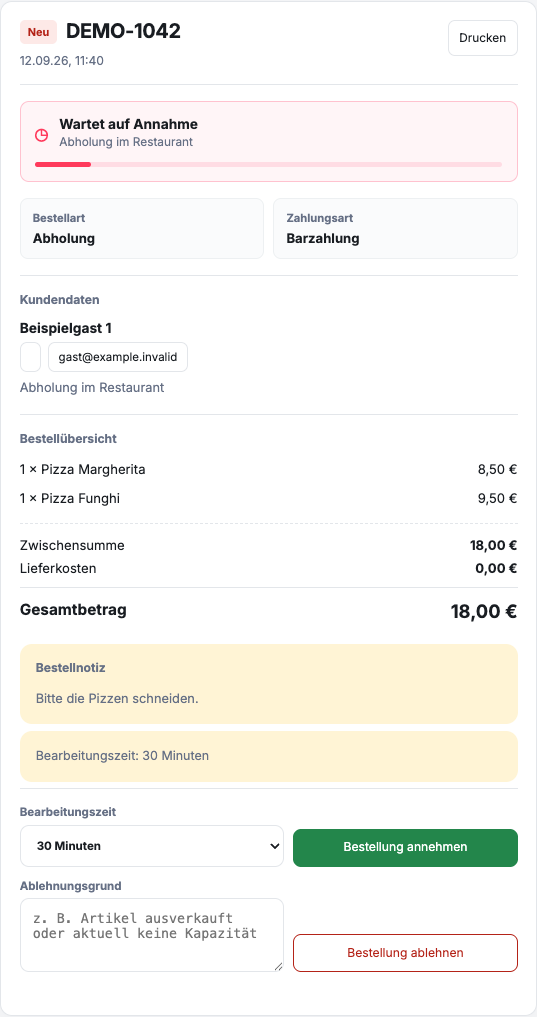
Open Orders, select the affected order and scroll to the promotions in the order details. At New or Saved stand there Processing time and Reason for rejection. The reason is a free text field, not a selection for given reasons.
An order that has already been accepted has the field instead Reason for cancellation and the action Cancel order. Before canceling, also check whether the preparation is already underway. A payment and its reimbursement must be checked separately.
When should you reject an order?
A rejection makes sense if the order cannot be completed completely, safely or in a reasonable time. Typical reasons include an unavailable main product, an unreachable delivery address or a short-term operational disruption.
Before rejecting, check whether a quick query or a realistic later processing time can solve the problem. However, do not change an order to a different dish or a different order type on your own initiative.
How do you reject the order?
- Open the affected order and check the order number, contents and guest details.
- Give in the field Reason for rejection a short, factual justification.
- Check the order and justification again.
- Click on Reject order.
- Check whether the order is as Rejected is displayed.
Appropriate justifications name the specific obstacle, such as “The dish you ordered is sold out today” or “Delivery to this area is currently not possible”. Internal details from the kitchen or personnel planning do not belong in the message.
What happens after rejection?
GastroSprint records the decision in the order status and informs the guest by email. If an in-person reconciliation has already taken place, your team should still check whether the order was completed correctly in the dashboard.
If you have any questions about a payment or refund that has already been made, the payment process agreed with your restaurant applies. Do not specify a fixed refund deadline without a confirmed transaction.